
Overtime Calculator
Overtime Calculated Automatically — Your Way
Whether your overtime kicks in after 40 hours a week or after a set number of hours in a single day, Shift Log+ handles both — and you stay in control of the rules.
Your estimate
These numbers update as you type.
Overtime Calculator Questions
Helpful context before you compare the estimate against your paycheck.
How do I calculate overtime pay?
Multiply regular hours by your hourly rate, then multiply overtime hours by your hourly rate times the overtime multiplier. A common weekly overtime rule is hours over 40 paid at 1.5 times the regular rate.
Does this calculator handle daily overtime or double time?
This free website calculator is a quick weekly overtime estimate. Shift Log+ handles daily overtime, weekly overtime, double time, and separate rules for each job.
Is this overtime calculator legal or payroll advice?
No. It is an estimate for planning. Overtime rules can vary by state, job type, employer policy, and exemption status, so verify your actual paycheck with official sources or a qualified professional.
Two Ways Overtime Works — Both Supported
Not everyone's overtime rules are the same. Shift Log+ handles both systems so your calculations are always accurate for your job.
Weekly Overtime
Regular pay up to 40 hours per week. Anything over 40 is paid at 1.5x your regular rate. Most common across the US.
Example: You work 46 hours this week at $20/hr.
40 hrs × $20 = $800 regular
6 hrs × $30 = $180 overtime
Total: $980
Daily Overtime
Regular pay up to a set number of hours per day — you choose the threshold (commonly 8 hrs). Overtime kicks in on any day you go over that, plus weekly overtime after 40 hrs.
Example: 8-hour daily threshold at $20/hr. You work a 10-hour shift.
8 hrs × $20 = $160 regular
2 hrs × $30 = $60 daily OT
Total: $220 for that shift
You Set the Rules — The App Does the Math
When you set up a job in Shift Log+, every overtime rule is yours to configure. Set your daily OT threshold, your weekly hour limit, your overtime multiplier, your double time threshold — all of it. Turn each tier on or off depending on what applies to your job.
Once it's set up, every shift you log is automatically calculated against your exact rules. No spreadsheet. No manual math. Just clock out and see what you earned.
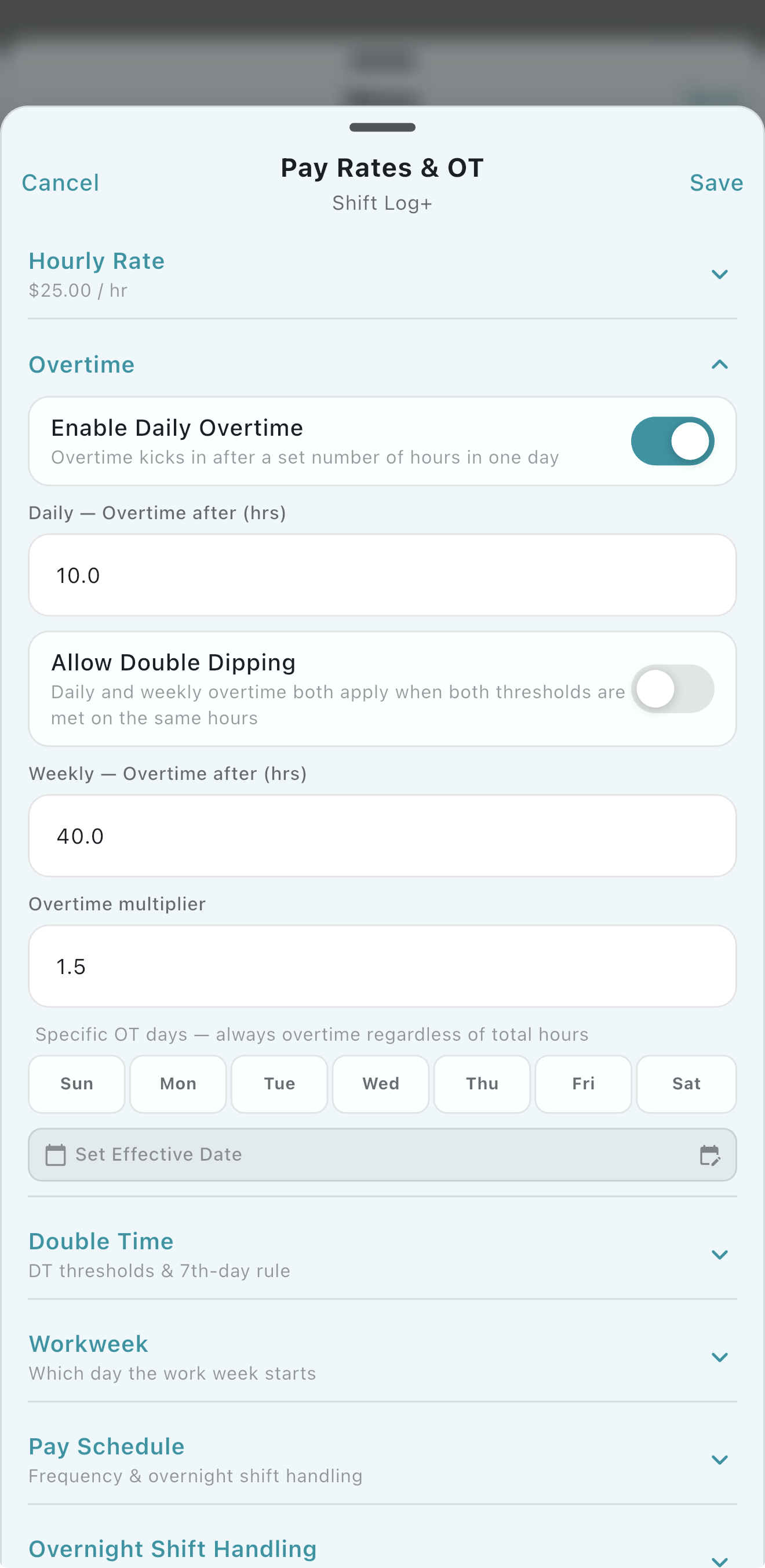
Every Overtime Tier Tracked — All Adjustable by You
Shift Log+ breaks your hours down clearly so you can see exactly where your pay comes from. Every threshold is set by you — nothing is locked in.
- ✓ Regular hours at your base rate — you set the rate
- ✓ Daily overtime — you set how many hours trigger it (e.g. 8, 10, or any number)
- ✓ Daily overtime multiplier — you set the rate (default 1.5x, fully adjustable)
- ✓ Weekly overtime — you set the weekly hour threshold (default 40)
- ✓ Double time — you set the daily hour threshold that triggers it (e.g. 12 hrs)
- ✓ Double time multiplier — you set the rate (default 2x, fully adjustable)
- ✓ Turn each tier on or off — only use what applies to your job
- ✓ Separate rules per job if you work multiple employers
See Your Pay Split After Every Shift
After you clock out, Shift Log+ shows you a clear breakdown of how much was regular time, how much was overtime, and what your total earnings are for the pay period so far.
No more wondering if your employer calculated your overtime correctly — you already have the numbers.
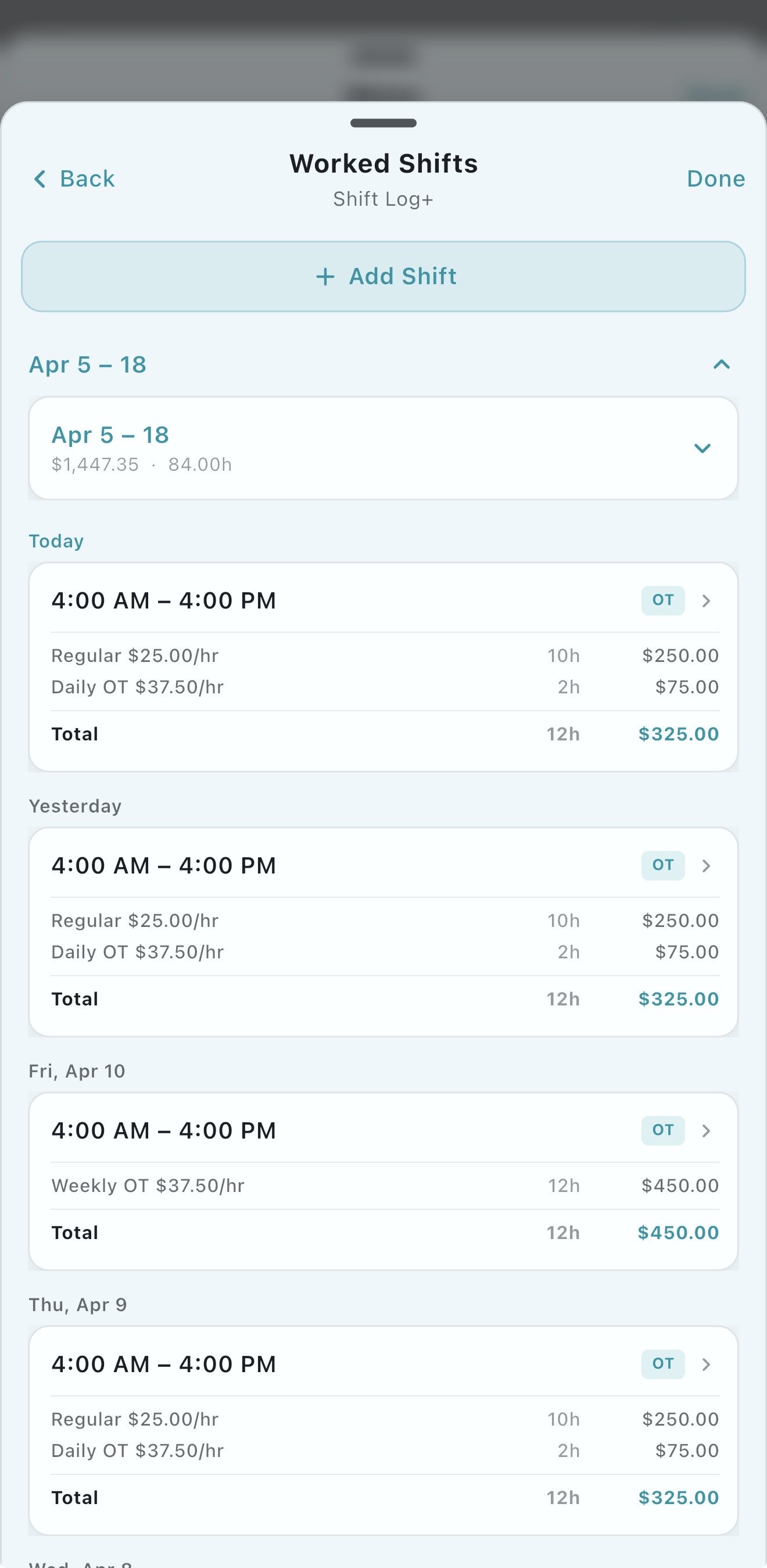
More Features
Shift Log+ does more than calculate overtime.
Paycheck Calculator
See your gross pay, deductions, and net pay updated live after every shift.
Work Hours Tracker
Track every shift, calculate your time card, and manage any schedule.
Hourly Pay Calculator
Calculate your exact earnings per shift based on your hourly rate.
Shift Differential Calculator
Estimate night shift premiums, weekend differentials, and overtime with premium pay.
Track Multiple Jobs
Manage hours and pay across two or more employers in one app.
Free Overtime Calculator App
45-day free trial. No credit card required. Works offline.
Home · Pricing · All Features